DSC, simply
Describe the settings you want. Let the machine check and apply them.
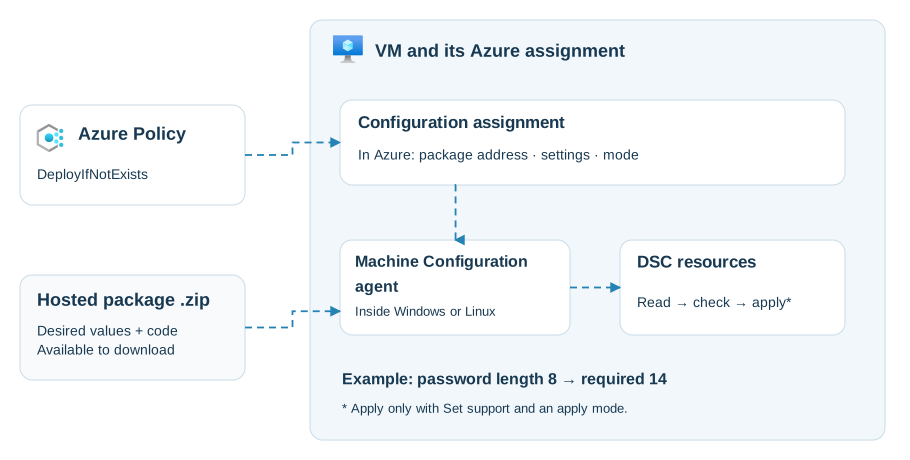
DSC means Desired State Configuration. You describe how a machine should be configured. DSC resources contain the code to check that state and, when supported, change it.
Example: minimum password length should be 14. The resource reads the Windows setting, compares it with 14, and can change it if needed. This changes the rule; it does not rewrite existing passwords.
What is inside the ZIP?
Azure Machine Configuration's PowerShell DSC package contains:
| Part | Purpose |
|---|---|
Settings file (.mof) |
The desired values, compiled from a PowerShell DSC configuration. |
| Resource modules | Code to Get the current value, Test it, and optionally Set it. |
| Metadata | Package details and whether it supports applying changes. |
It is a specific package format, not any zipped PowerShell script. Package format.
How Azure uses it
- Publish the ZIP where the VM can download it, usually Azure Storage.
- An enforcing Azure Policy deploys a configuration assignment to each selected VM: the package address, settings and mode.
- The Machine Configuration agent inside the VM downloads it and runs DSC. Azure Policy does not execute the code itself.
- The agent reports compliance back to Azure.
The VM needs the extension and identity first. Existing VMs need initial remediation to deploy the enforcing assignment. New VMs in scope receive it automatically.
| Mode | What happens inside the VM |
|---|---|
| Audit | Check and report. |
| ApplyAndMonitor | Apply once, then report later changes. |
| ApplyAndAutoCorrect | Apply, then correct later changes at the next evaluation. |
Applying requires a package that supports Set. Changing the mode cannot give an audit-only package that capability. Remediation modes.
Windows and Linux
DSC is separate from Azure Policy. Azure Machine Configuration supports PowerShell DSC on both Windows and Linux, using resources suited to the OS: Windows password settings, for example, or Linux file permissions.
Newer Microsoft DSC 3 also supports Windows, Linux and macOS, with JSON/YAML configuration and resources written in different languages. The ZIP/MOF flow above describes Azure's documented PowerShell DSC package workflow. DSC overview.