Storage account, simply
A storage account walkthrough: the setup choices, private endpoints, and the exception hiding behind disabled public access.
A storage account holds data in Azure. Blob Storage stores objects such as PDFs and images. Azure Files provides shared folders. Queues hold messages, and Tables hold structured, non-relational data. The account type determines which services are available. Storage account types.
This walkthrough follows a small Blob Storage lab. It explains the choices that raised questions during creation, then checks what public network access: Disabled actually means. Resource names in examples are placeholders.
Start with the resource group
A resource group holds related Azure resources. For example, rg-storage-test-001 could contain the account and its private endpoint.
Choose the subscription that owns the group. The group's region stores its metadata; individual resources can use other regions. Creating the group does not create storage or a network. Resource groups.
Tags such as environment=test help organize resources. They do not grant access, and resource-group tags do not automatically appear on its resources. An expires-on tag needs separate automation to delete anything. Azure tags.
Basics: which account do we need?
Storage account names must be globally unique, with 3–24 lowercase letters or digits. Hyphens are not allowed. The region is where the account is hosted. Account naming.
Why does Azure ask for Primary service?
It helps the portal give relevant setup guidance. Microsoft's guide calls this Preferred storage type. Choosing Blob does not, by itself, restrict the account to Blob. A wrong preference mainly gives less relevant guidance; review the final settings. Basics tab.
A Standard general-purpose v2 account can support Blob, Files, Queues and Tables. A Premium file shares account supports Files only. The actual account type and enabled features matter. Supported services.
Standard or Premium for private networking?
You do not need Premium to use a private endpoint. Standard is sufficient for this Blob lab. Premium targets workloads needing lower storage latency or higher performance; it does not automatically make an account private. Performance options, Private endpoint support.
What about redundancy and the access tier?
We chose LRS for replaceable learning data. It keeps copies within one datacenter. ZRS spreads copies across availability zones; geo-redundant options add a secondary region. LRS does not provide that wider protection. Replication also does not replace protection against accidental deletion. Redundancy options.
Hot suits frequently accessed blobs. Cool and Cold trade lower storage costs for higher access costs and minimum retention charges. Choose from expected usage, not just the cheapest storage price. Blob access tiers.
Advanced: what do these switches mean?
Hierarchical namespace
Think of this blob name:
invoices/2026/january.pdf
With hierarchical namespace off, the whole path is the blob's name. The portal displays the slashes as folder-like groups.
With it on, Azure manages actual directories: invoices, then 2026, then the file. A directory can be renamed without copying every blob to a new name. This helps analytics workloads that work with whole directories. Ordinary uploads do not require it. Enabling it cannot be undone by switching back to a flat namespace. Hierarchical namespace.
SFTP
SFTP means SSH File Transfer Protocol. A client such as WinSCP can upload files into a blob container. Azure hosts the service, so you do not need an SFTP VM.
Blob SFTP requires hierarchical namespace and uses TCP port 22. It can use private connectivity, but encrypted transfer alone does not make the endpoint private.
SFTP has an hourly charge while enabled, even when idle, plus normal usage charges. Leave it off unless an application or partner needs it. Portal, SDK and AzCopy uploads do not require SFTP. SFTP support and pricing model.
Managed Identity for SMB
SMB is the protocol used for shared folders, such as a mapped network drive. This setting lets a supported client use a managed identity to access Azure Files without storing an account key.
It still needs the identity, data permissions, authentication setup and network access. Microsoft's current setup requires clients that are not domain-joined. The checkbox alone does not make a drive work, and it does not control managed-identity access to Blob Storage. Managed identities for Azure Files SMB.
For this simple Blob lab, hierarchical namespace, SFTP and managed identity for SMB stayed off.
Networking: two separate checks
A permitted network connection does not grant permission to read data. A client needs both an allowed network path and authorization for the operation. Likewise, having data permissions does not bypass the network restrictions. Storage network access.
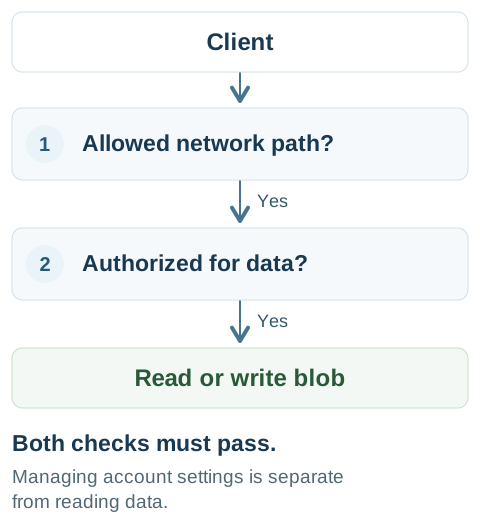
Public network access controls access through the public endpoint. Anonymous blob access controls whether containers can allow reads without authentication. These are different settings. A publicly reachable endpoint can still require authentication. Anonymous blob access.
Service endpoint or private endpoint?
| Choice | What it does |
|---|---|
| Service endpoint | Lets a subnet identify itself to Storage so a storage firewall rule can allow it through the public endpoint. |
| Private endpoint | Places a private IP in your VNet for access to a particular storage service. |
Storage does not require service endpoints. A service endpoint does not give the account a private IP, and a private endpoint does not need a service endpoint. VNet access rules.
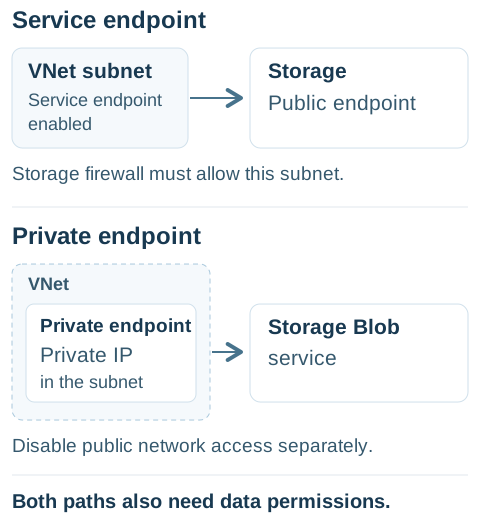
The storage service remains managed by Azure. The private endpoint is the part placed in your VNet. Creating one does not automatically disable the public endpoint; configure public network access separately. Endpoints are service-specific: a Blob private endpoint does not also provide private access to Azure Files. Storage private endpoints.
Disabled, but no private endpoint?
For a new, empty account with no permitted exceptions, ordinary applications have no data access path. It exists, but it cannot yet serve our private application.
Administrators with permission can still change account settings through Azure Resource Manager. Managing the resource and uploading a file are separate operations. The hostname still exists; an address alone does not mean requests are allowed. Network control boundaries.
That can be a temporary provisioning step. To use it privately, we still need a private endpoint, suitable DNS, a client that can reach the VNet, and data permissions. With the DNS configured, the client uses the usual storage hostname and resolves it to the private IP. Connecting to a private endpoint.
Also, Microsoft network routing is a routing preference for public-endpoint traffic. Selecting it does not make the account private. Routing preference.
The trusted-services exception
In this lab, the account was created with public access disabled, but Allow trusted Microsoft services to access this resource was still enabled.
Previously configured trusted-service and resource-instance exceptions can remain effective after public access is disabled. Review them separately before concluding that only private endpoints can reach the data. Microsoft's exception precedence guidance.
“Trusted” means Microsoft's defined services and supported scenarios. It does not mean every Azure VM or every Azure customer. Authentication and the service's required authorization still apply. Trusted services list.
The extra path matters: a compromised integration that already has data permissions could misuse them. That is a possible risk, not evidence that the account is publicly readable. This lab needed no such integration, so we removed the exception.
How we disabled it
The portal path was Networking → Public access → Resource settings → View → Exceptions. In the observed portal view, the checkbox was read-only while public access was disabled.
We used Azure CLI to remove the bypass without enabling public access. Replace both placeholders and use the intended subscription:
az storage account update \
  --resource-group "<resource-group>" \
  --name "<storage-account>" \
  --bypass None
None removes all bypass options, including any logging or metrics bypass. This lab only had AzureServices enabled. On an existing workload, check which exceptions its integrations need before removing them. Manage network exceptions.
Where Azure Policy fits
A Deny policy can reject a storage create or update request whose settings fail its rule. It does not repair existing accounts through a remediation task. Deny effect.
For this walkthrough, the inherited rule required publicNetworkAccess to equal Disabled:
| Selected value | Result under this rule |
|---|---|
| Enabled from all networks | Denied. |
| Enabled from selected networks | Denied; the public endpoint remains enabled. |
| Secured by perimeter | Denied; this is a different value from Disabled. |
| Disabled | Passes this check; other validation still applies. |
This describes that specific rule, not every storage policy. The wizard can show options that Azure Policy later rejects during validation or deployment.
A rule checking only public network access does not also check the trusted-services bypass. The lab account passed that check while the exception was still enabled. Policy compliance means the configured rule passed; it does not prove every network setting matches your intention.
What we verified in the lab
After creation and the exception change, Azure reported:
| Setting | Verified result |
|---|---|
| Deployment and account provisioning | Succeeded. |
| Account | Standard general-purpose v2, LRS, Hot. |
| Public network access | Disabled. |
| Default network action | Deny. |
| Trusted-service, logging and metrics bypass | None. |
| IP, VNet and resource-instance access rules | None. |
| Private endpoints | None yet. |
| Anonymous blob access | Disabled. |
| Secure transfer / minimum TLS | HTTPS required / TLS 1.2. |
Creation succeeded; private data connectivity is still unfinished. We verified the resource settings, not a successful upload through a private endpoint. The next step is to add that endpoint and DNS, then test an authorized client from the private network.