Azure Windows baseline, simply
One Azure Policy, many Windows security checks.
- Prerequisite initiativeIdentity + Machine Configuration extension
- Windows VMWindows baseline assignment
- Linux VMLinux baseline assignment
- Policy compliancePer-OS baseline results
Azure Windows baseline checks security settings inside Windows machines. It is one policy in the saved ASC Default list, containing many checks.
Its full name is “Windows machines should meet requirements of the Azure compute security baseline.”
It audits; it does not fix settings. The linked policy supports AuditIfNotExists or Disabled.
Set up VMs automatically with Azure Policy
Assign Deploy prerequisites to enable Guest Configuration policies on virtual machines at the subscription or management-group scope covering your baseline assignment. One assignment handles eligible VMs across that scope.
The initiative contains these four built-in policies:
| Policy / JSON | Effect | What it does |
|---|---|---|
| Deploy the Windows Guest Configuration extension to enable Guest Configuration assignments on Windows VMs | DeployIfNotExists |
Installs the Windows Machine Configuration extension. |
| Deploy the Linux Guest Configuration extension to enable Guest Configuration assignments on Linux VMs | DeployIfNotExists |
Installs the Linux Machine Configuration extension. |
| Add system-assigned managed identity to enable Guest Configuration assignments on virtual machines with no identities | Modify |
Enables system-assigned identity when the VM has no identity. |
| Add system-assigned managed identity to enable Guest Configuration assignments on VMs with a user-assigned identity | Modify |
Adds system-assigned identity while keeping existing user-assigned identities. |
Guest Configuration is the older name for Machine Configuration.
- In Azure Policy → Definitions, find the initiative above and select Assign. Keep enforcement enabled.
- Give the assignment's managed identity the required permissions. It performs setup; the VM's identity lets Machine Configuration access its service.
- For existing VMs, create remediation tasks for each applicable prerequisite policy. Eligible new or updated VMs are handled automatically.
- Check prerequisite compliance, then review the Windows baseline results.
ASC Default's audit alone does not install these prerequisites. This setup enables auditing; it does not fix Windows baseline settings. Microsoft setup requirements.
For how the agent checks and applies settings, read DSC, simply.
All baseline checks
285 documented checks from Microsoft's Windows Server 2012–2022 reference, including its Azure Stack entries. Your OS and baseline settings determine which apply.
Password checks include history, minimum and maximum age, minimum length, and complexity. Open the table and search for “password”.
Windows baseline checks (285)
Expected values are raw policy or registry values; 0 does not always mean “off”.
| Check / source | Expected value | Windows versions |
|---|---|---|
| Account Lockout Duration · AZ-WIN-73312 | >= 15 (Policy) |
WS2012, WS2012R2, WS2016, WS2019, WS2022 |
| Configure detection for potentially unwanted applications · AZ-WIN-202219 | = 1 (Registry) |
WS2012, WS2012R2, WS2016, WS2019, WS2022 |
| Scan all downloaded files and attachments · AZ-WIN-202221 | = 0 (Registry) |
WS2012, WS2012R2, WS2016, WS2019, WS2022 |
| Turn off Microsoft Defender AntiVirus · AZ-WIN-202220 | = 0 (Registry) |
WS2012, WS2012R2, WS2016, WS2019, WS2022 |
| Turn off real-time protection · AZ-WIN-202222 | = 0 (Registry) |
WS2012, WS2012R2, WS2016, WS2019, WS2022 |
| Turn on e-mail scanning · AZ-WIN-202218 | = 0 (Registry) |
WS2012, WS2012R2, WS2016, WS2019, WS2022 |
| Turn on script scanning · AZ-WIN-202223 | = 0 (Registry) |
WS2012, WS2012R2, WS2016, WS2019, WS2022 |
| Allow Input Personalization · AZ-WIN-00168 | = 0 (Registry) |
WS2016, WS2019, WS2022 |
| Disable SMB v1 client (remove dependency on LanmanWorkstation) · AZ-WIN-00122 | Doesn't exist or = Bowser\0MRxSmb20\0NSI\0\0 (Registry) |
WS2008, WS2008R2, WS2012 |
| WDigest Authentication · AZ-WIN-73497 | = 0 (Registry) |
WS2016, WS2019 |
| MSS: (DisableIPSourceRouting IPv6) IP source routing protection level (protects against packet spoofing) · AZ-WIN-202213 | = 2 (Registry) |
WS2012, WS2012R2, WS2016, WS2019, WS2022 |
| MSS: (DisableIPSourceRouting) IP source routing protection level (protects against packet spoofing) · AZ-WIN-202244 | = 2 (Registry) |
WS2012, WS2012R2, WS2016, WS2019, WS2022 |
| MSS: (NoNameReleaseOnDemand) Allow the computer to ignore NetBIOS name release requests except from WINS servers · AZ-WIN-202214 | = 1 (Registry) |
WS2012, WS2012R2, WS2016, WS2019, WS2022 |
| MSS: (SafeDllSearchMode) Enable Safe DLL search mode (recommended) · AZ-WIN-202215 | = 1 (Registry) |
WS2012, WS2012R2, WS2016, WS2019, WS2022 |
| MSS: (WarningLevel) Percentage threshold for the security event log at which the system will generate a warning · AZ-WIN-202212 | <= 90 (Registry) |
WS2012, WS2012R2, WS2016, WS2019, WS2022 |
| Windows Server must be configured to prevent Internet Control Message Protocol (ICMP) redirects from overriding Open Shortest Path First (OSPF)-generated routes. · AZ-WIN-73503 | = 0 (Registry) |
WS2016, WS2019, WS2022 |
| Enable insecure guest logons · AZ-WIN-00171 | = 0 (Registry) |
WS2016, WS2019, WS2022 |
| Hardened UNC Paths - NETLOGON · AZ_WIN_202250 | = RequireMutualAuthentication=1, RequireIntegrity=1 (Registry) |
WS2012, WS2012R2, WS2016, WS2019, WS2022 |
| Hardened UNC Paths - SYSVOL · AZ_WIN_202251 | = RequireMutualAuthentication=1, RequireIntegrity=1 (Registry) |
WS2012, WS2012R2, WS2016, WS2019, WS2022 |
| Minimize the number of simultaneous connections to the Internet or a Windows Domain · CCE-38338-0 | Doesn't exist or = 1 (Registry) |
WS2012, WS2012R2, WS2016, WS2019, WS2022 |
| Prohibit installation and configuration of Network Bridge on your DNS domain network · CCE-38002-2 | = 0 (Registry) |
WS2008, WS2008R2, WS2012, WS2012R2, WS2016, WS2019, WS2022 |
| Prohibit use of Internet Connection Sharing on your DNS domain network · AZ-WIN-00172 | = 0 (Registry) |
WS2008, WS2008R2, WS2012, WS2012R2, WS2016, WS2019, WS2022 |
| Turn off multicast name resolution · AZ-WIN-00145 | = 0 (Registry) |
WS2016, WS2019, WS2022 |
| Enable Structured Exception Handling Overwrite Protection (SEHOP) · AZ-WIN-202210 | = 0 (Registry) |
WS2012, WS2012R2, WS2016, WS2019, WS2022 |
| NetBT NodeType configuration · AZ-WIN-202211 | = 2 (Registry) |
WS2012, WS2012R2, WS2016, WS2019, WS2022 |
| Block user from showing account details on sign-in · AZ-WIN-00138 | = 1 (Registry) |
WS2016, WS2019, WS2022 |
| Boot-Start Driver Initialization Policy · CCE-37912-3 | Doesn't exist or = 3 (Registry) |
WS2012, WS2012R2, WS2016, WS2019, WS2022 |
| Configure Offer Remote Assistance · CCE-36388-7 | Doesn't exist or = 0 (Registry) |
WS2008, WS2008R2, WS2012, WS2012R2, WS2016, WS2019, WS2022 |
| Configure Solicited Remote Assistance · CCE-37281-3 | = 0 (Registry) |
WS2008, WS2008R2, WS2012, WS2012R2, WS2016, WS2019, WS2022 |
| Do not display network selection UI · CCE-38353-9 | = 1 (Registry) |
WS2012, WS2012R2, WS2016, WS2019, WS2022 |
| Do not enumerate connected users on domain-joined computers · AZ-WIN-202216 | = 1 (Registry) |
WS2012, WS2012R2, WS2016, WS2019, WS2022 |
| Enable RPC Endpoint Mapper Client Authentication · CCE-37346-4 | = 1 (Registry) |
WS2008, WS2008R2, WS2012, WS2012R2, WS2016, WS2019, WS2022 |
| Enable Windows NTP Client · CCE-37843-0 | = 1 (Registry) |
WS2008, WS2008R2, WS2012, WS2012R2, WS2016, WS2019, WS2022 |
| Encryption Oracle Remediation for CredSSP protocol · AZ-WIN-201910 | = 0 (Registry) |
WS2016, WS2019 |
| Ensure 'Configure registry policy processing: Do not apply during periodic background processing' is set to 'Enabled: FALSE' · CCE-36169-1 | = 0 (Registry) |
WS2008, WS2008R2, WS2012, WS2012R2, WS2016, WS2019, WS2022 |
| Ensure 'Configure registry policy processing: Process even if the Group Policy objects have not changed' is set to 'Enabled: TRUE' · CCE-36169-1a | = 0 (Registry) |
WS2008, WS2008R2, WS2012, WS2012R2, WS2016, WS2019, WS2022 |
| Ensure 'Continue experiences on this device' is set to 'Disabled' · AZ-WIN-00170 | Doesn't exist or = 0 (Registry) |
WS2016, WS2019, WS2022 |
| Enumerate local users on domain-joined computers · AZ_WIN_202204 | Doesn't exist or = 0 (Registry) |
WS2012, WS2012R2, WS2016, WS2019, WS2022 |
| Include command line in process creation events · CCE-36925-6 | = 1 (Registry) |
WS2008R2, WS2012, WS2012R2, WS2016, WS2019, WS2022 |
| Prevent device metadata retrieval from the Internet · AZ-WIN-202251 | = 1 (Registry) |
WS2012, WS2012R2, WS2016, WS2019, WS2022 |
| Remote host allows delegation of non-exportable credentials · AZ-WIN-20199 | = 1 (Registry) |
WS2016, WS2019 |
| Turn off app notifications on the lock screen · CCE-35893-7 | = 1 (Registry) |
WS2012, WS2012R2, WS2016, WS2019, WS2022 |
| Turn off background refresh of Group Policy · CCE-14437-8 | = 0 (Registry) |
WS2012, WS2012R2, WS2016, WS2019, WS2022 |
| Turn off downloading of print drivers over HTTP · CCE-36625-2 | = 1 (Registry) |
WS2008, WS2008R2, WS2012, WS2012R2, WS2016, WS2019, WS2022 |
| Turn off Internet Connection Wizard if URL connection is referring to Microsoft.com · CCE-37163-3 | = 1 (Registry) |
WS2008, WS2008R2, WS2012, WS2012R2, WS2016, WS2019, WS2022 |
| Turn on convenience PIN sign-in · CCE-37528-7 | Doesn't exist or = 0 (Registry) |
WS2012, WS2012R2, WS2016, WS2019, WS2022 |
| Turn off cloud consumer account state content · AZ-WIN-202217 | = 1 (Registry) |
WS2012, WS2012R2, WS2016, WS2019, WS2022 |
| Do not allow drive redirection · AZ-WIN-73569 | = 1 (Registry) |
WS2012, WS2012R2, WS2016, WS2019, WS2022 |
| Turn on PowerShell Transcription · AZ-WIN-202208 | = 0 (Registry) |
WS2012, WS2012R2, WS2016, WS2019, WS2022 |
| Prevent users from modifying settings · AZ-WIN-202209 | = 1 (Registry) |
WS2012, WS2012R2, WS2016, WS2019, WS2022 |
| Configure Attack Surface Reduction rules · AZ_WIN_202205 | = 1 (Registry) |
WS2012, WS2012R2, WS2016, WS2019, WS2022 |
| Prevent users and apps from accessing dangerous websites · AZ_WIN_202207 | = 1 (Registry) |
WS2012, WS2012R2, WS2016, WS2019, WS2022 |
| Audit Computer Account Management · CCE-38004-8 | = Success (Audit) |
WS2008, WS2008R2, WS2012, WS2012R2, WS2016, WS2019, WS2022 |
| Enable boot DMA protection · AZ-WIN-202250 | = 1 (OsConfig) |
· WSASHCI22H2 |
| Enable hypervisor enforced code integrity · AZ-WIN-202246 | = 0 (OsConfig) |
· WSASHCI22H2 |
| Enable secure boot · AZ-WIN-202248 | = 1 (OsConfig) |
· WSASHCI22H2 |
| Enable system guard · AZ-WIN-202247 | = 0 (OsConfig) |
· WSASHCI22H2 |
| Enable virtualization based security · AZ-WIN-202245 | = 0 (OsConfig) |
· WSASHCI22H2 |
| Set TPM version · AZ-WIN-202249 | Contains 2.0 (OsConfig) |
· WSASHCI22H2 |
| Accounts: Block Microsoft accounts · AZ-WIN-202201 | = 3 (Registry) |
WS2012, WS2012R2, WS2016, WS2019, WS2022 |
| Accounts: Guest account status · CCE-37432-2 | = 0 (Policy) |
WS2008, WS2008R2, WS2012, WS2012R2, WS2016, WS2019, WS2022 |
| Accounts: Limit local account use of blank passwords to console logon only · CCE-37615-2 | Doesn't exist or = 1 (Registry) |
WS2008, WS2008R2, WS2012, WS2012R2, WS2016, WS2019, WS2022 |
| Accounts: Rename guest account · AZ-WIN-202255 | \!= Guest (Policy) |
WS2008, WS2008R2, WS2012, WS2012R2, WS2016, WS2019, WS2022 |
| Network access: Allow anonymous SID/Name translation · CCE-10024-8 | = 0 (Policy) |
WS2008, WS2008R2, WS2012, WS2012R2, WS2016, WS2019, WS2022 |
| Audit: Force audit policy subcategory settings (Windows Vista or later) to override audit policy category settings · CCE-37850-5 | Doesn't exist or = 1 (Registry) |
WS2008, WS2008R2, WS2012, WS2012R2, WS2016, WS2019, WS2022 |
| Audit: Shut down system immediately if unable to log security audits · CCE-35907-5 | Doesn't exist or = 0 (Registry) |
WS2008, WS2008R2, WS2012, WS2012R2, WS2016, WS2019, WS2022 |
| Devices: Allowed to format and eject removable media · CCE-37701-0 | Doesn't exist or = 0 (Registry) |
WS2008, WS2008R2, WS2012, WS2012R2, WS2016, WS2019, WS2022 |
| Devices: Prevent users from installing printer drivers · CCE-37942-0 | Doesn't exist or = 1 (Registry) |
WS2008, WS2008R2, WS2012, WS2012R2, WS2016, WS2019, WS2022 |
| Limits print driver installation to Administrators · AZ_WIN_202202 | = 1 (Registry) |
WS2008, WS2008R2, WS2012, WS2012R2, WS2016, WS2019, WS2022 |
| Ensure 'Domain member: Digitally encrypt or sign secure channel data (always)' is set to 'Enabled' · CCE-36142-8 | Doesn't exist or = 1 (Registry) |
WS2008, WS2008R2, WS2012, WS2012R2, WS2016, WS2019, WS2022 |
| Ensure 'Domain member: Digitally encrypt secure channel data (when possible)' is set to 'Enabled' · CCE-37130-2 | Doesn't exist or = 1 (Registry) |
WS2008, WS2008R2, WS2012, WS2012R2, WS2016, WS2019, WS2022 |
| Ensure 'Domain member: Digitally sign secure channel data (when possible)' is set to 'Enabled' · CCE-37222-7 | Doesn't exist or = 1 (Registry) |
WS2008, WS2008R2, WS2012, WS2012R2, WS2016, WS2019, WS2022 |
| Ensure 'Domain member: Disable machine account password changes' is set to 'Disabled' · CCE-37508-9 | Doesn't exist or = 0 (Registry) |
WS2008, WS2008R2, WS2012, WS2012R2, WS2016, WS2019, WS2022 |
| Ensure 'Domain member: Maximum machine account password age' is set to '30 or fewer days, but not 0' · CCE-37431-4 | In 1-30 (Registry) |
WS2008, WS2008R2, WS2012, WS2012R2, WS2016, WS2019, WS2022 |
| Ensure 'Domain member: Require strong (Windows 2000 or later) session key' is set to 'Enabled' · CCE-37614-5 | Doesn't exist or = 1 (Registry) |
WS2008, WS2008R2, WS2012, WS2012R2, WS2016, WS2019, WS2022 |
| Caching of logon credentials must be limited · AZ-WIN-73651 | In 1-4 (Registry) |
WS2016, WS2019, WS2022 |
| Interactive logon: Do not display last user name · CCE-36056-0 | = 1 (Registry) |
WS2008, WS2008R2, WS2012, WS2012R2, WS2016, WS2019, WS2022 |
| Interactive logon: Do not require CTRL+ALT+DEL · CCE-37637-6 | Doesn't exist or = 0 (Registry) |
WS2008, WS2008R2, WS2012, WS2012R2, WS2016, WS2019, WS2022 |
| Interactive logon: Machine inactivity limit · AZ-WIN-73645 | In 1-900 (Registry) |
WS2016, WS2019, WS2022 |
| Interactive logon: Message text for users attempting to log on · AZ-WIN-202253 | \!= (Registry) |
WS2012, WS2012R2, WS2016, WS2019, WS2022 |
| Interactive logon: Message title for users attempting to log on · AZ-WIN-202254 | \!= (Registry) |
WS2012, WS2012R2, WS2016, WS2019, WS2022 |
| Interactive logon: Prompt user to change password before expiration · CCE-10930-6 | In 5-14 (Registry) |
WS2012, WS2012R2, WS2016, WS2019, WS2022 |
| Microsoft network client: Digitally sign communications (always) · CCE-36325-9 | = 1 (Registry) |
WS2008, WS2008R2, WS2012, WS2012R2, WS2016, WS2019, WS2022 |
| Microsoft network client: Digitally sign communications (if server agrees) · CCE-36269-9 | Doesn't exist or = 1 (Registry) |
WS2008, WS2008R2, WS2012, WS2012R2, WS2016, WS2019, WS2022 |
| Microsoft network client: Send unencrypted password to third-party SMB servers · CCE-37863-8 | Doesn't exist or = 0 (Registry) |
WS2008, WS2008R2, WS2012, WS2012R2, WS2016, WS2019, WS2022 |
| Microsoft network server: Amount of idle time required before suspending session · CCE-38046-9 | In 1-15 (Registry) |
WS2008, WS2008R2, WS2012, WS2012R2, WS2016, WS2019, WS2022 |
| Microsoft network server: Digitally sign communications (always) · CCE-37864-6 | = 1 (Registry) |
WS2008, WS2008R2, WS2012, WS2012R2, WS2016, WS2019, WS2022 |
| Microsoft network server: Digitally sign communications (if client agrees) · CCE-35988-5 | = 1 (Registry) |
WS2008, WS2008R2, WS2012, WS2012R2, WS2016, WS2019, WS2022 |
| Microsoft network server: Disconnect clients when logon hours expire · CCE-37972-7 | Doesn't exist or = 1 (Registry) |
WS2008, WS2008R2, WS2012, WS2012R2, WS2016, WS2019, WS2022 |
| Microsoft network server: Server SPN target name validation level · CCE-10617-9 | = 1 (Registry) |
WS2008, WS2008R2, WS2012, WS2012R2, WS2016, WS2019, WS2022 |
| Disable SMB v1 server · AZ-WIN-00175 | Doesn't exist or = 0 (Registry) |
WS2008, WS2008R2, WS2012, WS2012R2, WS2016, WS2019, WS2022 |
| Accounts: Rename administrator account · CCE-10976-9 | \!= Administrator (Policy) |
WS2012, WS2012R2, WS2016, WS2019, WS2022 |
| Network access: Do not allow anonymous enumeration of SAM accounts · CCE-36316-8 | Doesn't exist or = 1 (Registry) |
WS2008, WS2008R2, WS2012, WS2012R2, WS2016, WS2019, WS2022 |
| Network access: Do not allow anonymous enumeration of SAM accounts and shares · CCE-36077-6 | = 1 (Registry) |
WS2008, WS2008R2, WS2012, WS2012R2, WS2016, WS2019, WS2022 |
| Network access: Let Everyone permissions apply to anonymous users · CCE-36148-5 | Doesn't exist or = 0 (Registry) |
WS2008, WS2008R2, WS2012, WS2012R2, WS2016, WS2019, WS2022 |
| Network access: Remotely accessible registry paths · CCE-37194-8 | Doesn't exist or = System\CurrentControlSet\Control\ProductOptions\0System\CurrentControlSet\Control\Server Applications\0Software\Microsoft\Windows NT\CurrentVersion\0\0 (Registry) |
WS2008, WS2008R2, WS2012, WS2012R2, WS2016, WS2019, WS2022 |
| Network access: Remotely accessible registry paths and sub-paths · CCE-36347-3 | Doesn't exist or = System\CurrentControlSet\Control\Print\Printers\0System\CurrentControlSet\Services\Eventlog\0Software\Microsoft\OLAP Server\0Software\Microsoft\Windows NT\CurrentVersion\Print\0Software\Microsoft\Windows NT\CurrentVersion\Windows\0System\CurrentControlSet\Control\ContentIndex\0System\CurrentControlSet\Control\Terminal Server\0System\CurrentControlSet\Control\Terminal Server\UserConfig\0System\CurrentControlSet\Control\Terminal Server\DefaultUserConfiguration\0Software\Microsoft\Windows NT\CurrentVersion\Perflib\0System\CurrentControlSet\Services\SysmonLog\0\0 (Registry) |
WS2008, WS2008R2, WS2012, WS2012R2, WS2016, WS2019, WS2022 |
| Network access: Restrict anonymous access to Named Pipes and Shares · CCE-36021-4 | Doesn't exist or = 1 (Registry) |
WS2008, WS2008R2, WS2012, WS2012R2, WS2016, WS2019, WS2022 |
| Network access: Restrict clients allowed to make remote calls to SAM · AZ-WIN-00142 | Doesn't exist or = O:BAG:BAD:(A;;RC;;;BA) (Registry) |
WS2016, WS2019, WS2022 |
| Network access: Shares that can be accessed anonymously · CCE-38095-6 | Doesn't exist or = (Registry) |
WS2008, WS2008R2, WS2012, WS2012R2, WS2016, WS2019, WS2022 |
| Network access: Sharing and security model for local accounts · CCE-37623-6 | Doesn't exist or = 0 (Registry) |
WS2008, WS2008R2, WS2012, WS2012R2, WS2016, WS2019, WS2022 |
| Network security: Allow Local System to use computer identity for NTLM · CCE-38341-4 | = 1 (Registry) |
WS2008R2, WS2012, WS2012R2, WS2016, WS2019, WS2022 |
| Network security: Allow LocalSystem NULL session fallback · CCE-37035-3 | Doesn't exist or = 0 (Registry) |
WS2008, WS2008R2, WS2012, WS2012R2, WS2016, WS2019, WS2022 |
| Network Security: Allow PKU2U authentication requests to this computer to use online identities · CCE-38047-7 | Doesn't exist or = 0 (Registry) |
WS2008, WS2008R2, WS2012, WS2012R2, WS2016, WS2019, WS2022 |
| Network Security: Configure encryption types allowed for Kerberos · CCE-37755-6 | Doesn't exist or = 2147483640 (Registry) |
WS2008R2, WS2012, WS2012R2, WS2016, WS2019, WS2022 |
| Network security: Do not store LAN Manager hash value on next password change · CCE-36326-7 | Doesn't exist or = 1 (Registry) |
WS2008, WS2008R2, WS2012, WS2012R2, WS2016, WS2019, WS2022 |
| Network security: LAN Manager authentication level · CCE-36173-3 | = 5 (Registry) |
WS2008, WS2008R2, WS2012, WS2012R2, WS2016, WS2019, WS2022 |
| Network security: LDAP client signing requirements · CCE-36858-9 | Doesn't exist or = 1 (Registry) |
WS2008, WS2008R2, WS2012, WS2012R2, WS2016, WS2019, WS2022 |
| Network security: Minimum session security for NTLM SSP based (including secure RPC) clients · CCE-37553-5 | = 537395200 (Registry) |
WS2008, WS2008R2, WS2012, WS2012R2, WS2016, WS2019, WS2022 |
| Network security: Minimum session security for NTLM SSP based (including secure RPC) servers · CCE-37835-6 | = 537395200 (Registry) |
WS2008, WS2008R2, WS2012, WS2012R2, WS2016, WS2019, WS2022 |
| Shutdown: Allow system to be shut down without having to log on · CCE-36788-8 | Doesn't exist or = 0 (Registry) |
WS2008, WS2008R2, WS2012, WS2012R2, WS2016, WS2019, WS2022 |
| Shutdown: Clear virtual memory pagefile · AZ-WIN-00181 | Doesn't exist or = 0 (Registry) |
WS2008, WS2008R2, WS2012, WS2012R2, WS2016, WS2019, WS2022 |
| Users must be required to enter a password to access private keys stored on the computer. · AZ-WIN-73699 | = 2 (Registry) |
WS2016, WS2019, WS2022 |
| Windows Server must be configured to use FIPS-compliant algorithms for encryption, hashing, and signing. · AZ-WIN-73701 | = 1 (Registry) |
WS2016, WS2019, WS2022 |
| System objects: Require case insensitivity for non-Windows subsystems · CCE-37885-1 | Doesn't exist or = 1 (Registry) |
WS2008, WS2008R2, WS2012, WS2012R2, WS2016, WS2019, WS2022 |
| System objects: Strengthen default permissions of internal system objects (e.g. Symbolic Links) · CCE-37644-2 | = 1 (Registry) |
WS2008, WS2008R2, WS2012, WS2012R2, WS2016, WS2019, WS2022 |
| System settings: Use Certificate Rules on Windows Executables for Software Restriction Policies · AZ-WIN-00155 | = 1 (Registry) |
WS2008, WS2008R2, WS2012, WS2012R2, WS2016, WS2019, WS2022 |
| User Account Control: Admin Approval Mode for the Built-in Administrator account · CCE-36494-3 | = 1 (Registry) |
WS2008, WS2008R2, WS2012, WS2012R2, WS2016, WS2019, WS2022 |
| User Account Control: Allow UIAccess applications to prompt for elevation without using the secure desktop · CCE-36863-9 | = 0 (Registry) |
WS2008, WS2008R2, WS2012, WS2012R2, WS2016, WS2019, WS2022 |
| User Account Control: Behavior of the elevation prompt for administrators in Admin Approval Mode · CCE-37029-6 | = 2 (Registry) |
WS2008, WS2008R2, WS2012, WS2012R2, WS2016, WS2019, WS2022 |
| User Account Control: Behavior of the elevation prompt for standard users · CCE-36864-7 | = 0 (Registry) |
WS2008, WS2008R2, WS2012, WS2012R2, WS2016, WS2019, WS2022 |
| User Account Control: Detect application installations and prompt for elevation · CCE-36533-8 | = 1 (Registry) |
WS2008, WS2008R2, WS2012, WS2012R2, WS2016, WS2019, WS2022 |
| User Account Control: Only elevate UIAccess applications that are installed in secure locations · CCE-37057-7 | = 1 (Registry) |
WS2008, WS2008R2, WS2012, WS2012R2, WS2016, WS2019, WS2022 |
| User Account Control: Run all administrators in Admin Approval Mode · CCE-36869-6 | = 1 (Registry) |
WS2008, WS2008R2, WS2012, WS2012R2, WS2016, WS2019, WS2022 |
| User Account Control: Switch to the secure desktop when prompting for elevation · CCE-36866-2 | = 1 (Registry) |
WS2008, WS2008R2, WS2012, WS2012R2, WS2016, WS2019, WS2022 |
| User Account Control: Virtualize file and registry write failures to per-user locations · CCE-37064-3 | = 1 (Registry) |
WS2008, WS2008R2, WS2012, WS2012R2, WS2016, WS2019, WS2022 |
| Account lockout threshold · AZ-WIN-73311 | In 1-3 (Policy) |
WS2016, WS2019, WS2022 |
| Enforce password history · CCE-37166-6 | >= 24 (Policy) |
WS2008, WS2008R2, WS2012, WS2012R2, WS2016, WS2019, WS2022 |
| Maximum password age · CCE-37167-4 | In 1-70 (Policy) |
WS2008, WS2008R2, WS2012, WS2012R2, WS2016, WS2019, WS2022 |
| Minimum password age · CCE-37073-4 | >= 1 (Policy) |
WS2008, WS2008R2, WS2012, WS2012R2, WS2016, WS2019, WS2022 |
| Minimum password length · CCE-36534-6 | >= 14 (Policy) |
WS2008, WS2008R2, WS2012, WS2012R2, WS2016, WS2019, WS2022 |
| Password must meet complexity requirements · CCE-37063-5 | = 1 (Policy) |
WS2008, WS2008R2, WS2012, WS2012R2, WS2016, WS2019, WS2022 |
| Reset account lockout counter after · AZ-WIN-73309 | >= 15 (Policy) |
WS2012, WS2012R2, WS2016, WS2019, WS2022 |
| Store passwords using reversible encryption · CCE-36286-3 | = 0 (Policy) |
WS2008, WS2008R2, WS2012, WS2012R2, WS2016, WS2019, WS2022 |
| Windows Firewall: Domain: Allow unicast response · AZ-WIN-00088 | = 0 (Registry) |
WS2008, WS2008R2, WS2012, WS2012R2, WS2016, WS2019, WS2022 |
| Windows Firewall: Domain: Firewall state · CCE-36062-8 | = 1 (Registry) |
WS2008, WS2008R2, WS2012, WS2012R2, WS2016, WS2019, WS2022 |
| Windows Firewall: Domain: Inbound connections · AZ-WIN-202252 | = 1 (Registry) |
WS2012, WS2012R2, WS2016, WS2019, WS2022 |
| Windows Firewall: Domain: Logging: Log dropped packets · AZ-WIN-202226 | = 1 (Registry) |
WS2012, WS2012R2, WS2016, WS2019, WS2022 |
| Windows Firewall: Domain: Logging: Log successful connections · AZ-WIN-202227 | = 1 (Registry) |
WS2012, WS2012R2, WS2016, WS2019, WS2022 |
| Windows Firewall: Domain: Logging: Name · AZ-WIN-202224 | = %SystemRoot%\System32\logfiles\firewall\domainfw.log (Registry) |
WS2012, WS2012R2, WS2016, WS2019, WS2022 |
| Windows Firewall: Domain: Logging: Size limit (KB) · AZ-WIN-202225 | >= 16384 (Registry) |
WS2012, WS2012R2, WS2016, WS2019, WS2022 |
| Windows Firewall: Domain: Outbound connections · CCE-36146-9 | = 0 (Registry) |
WS2008, WS2008R2, WS2012, WS2012R2, WS2016, WS2019, WS2022 |
| Windows Firewall: Domain: Settings: Apply local connection security rules · CCE-38040-2 | = 1 (Registry) |
WS2008, WS2008R2, WS2012, WS2012R2, WS2016, WS2019, WS2022 |
| Windows Firewall: Domain: Settings: Apply local firewall rules · CCE-37860-4 | Doesn't exist or = 1 (Registry) |
WS2008, WS2008R2, WS2012, WS2012R2, WS2016, WS2019, WS2022 |
| Windows Firewall: Domain: Settings: Display a notification · CCE-38041-0 | = 1 (Registry) |
WS2008, WS2008R2, WS2012, WS2012R2, WS2016, WS2019, WS2022 |
| Windows Firewall: Private: Allow unicast response · AZ-WIN-00089 | = 0 (Registry) |
WS2008, WS2008R2, WS2012, WS2012R2, WS2016, WS2019, WS2022 |
| Windows Firewall: Private: Firewall state · CCE-38239-0 | = 1 (Registry) |
WS2008, WS2008R2, WS2012, WS2012R2, WS2016, WS2019, WS2022 |
| Windows Firewall: Private: Inbound connections · AZ-WIN-202228 | = 1 (Registry) |
WS2012, WS2012R2, WS2016, WS2019, WS2022 |
| Windows Firewall: Private: Logging: Log dropped packets · AZ-WIN-202231 | = 1 (Registry) |
WS2012, WS2012R2, WS2016, WS2019, WS2022 |
| Windows Firewall: Private: Logging: Log successful connections · AZ-WIN-202232 | = 1 (Registry) |
WS2012, WS2012R2, WS2016, WS2019, WS2022 |
| Windows Firewall: Private: Logging: Name · AZ-WIN-202229 | = %SystemRoot%\System32\logfiles\firewall\privatefw.log (Registry) |
WS2012, WS2012R2, WS2016, WS2019, WS2022 |
| Windows Firewall: Private: Logging: Size limit (KB) · AZ-WIN-202230 | >= 16384 (Registry) |
WS2012, WS2012R2, WS2016, WS2019, WS2022 |
| Windows Firewall: Private: Outbound connections · CCE-38332-3 | = 0 (Registry) |
WS2008, WS2008R2, WS2012, WS2012R2, WS2016, WS2019, WS2022 |
| Windows Firewall: Private: Settings: Apply local connection security rules · CCE-36063-6 | = 1 (Registry) |
WS2008, WS2008R2, WS2012, WS2012R2, WS2016, WS2019, WS2022 |
| Windows Firewall: Private: Settings: Apply local firewall rules · CCE-37438-9 | Doesn't exist or = 1 (Registry) |
WS2008, WS2008R2, WS2012, WS2012R2, WS2016, WS2019, WS2022 |
| Windows Firewall: Private: Settings: Display a notification · CCE-37621-0 | = 1 (Registry) |
WS2008, WS2008R2, WS2012, WS2012R2, WS2016, WS2019, WS2022 |
| Windows Firewall: Public: Allow unicast response · AZ-WIN-00090 | = 1 (Registry) |
WS2008, WS2008R2, WS2012, WS2012R2, WS2016, WS2019, WS2022 |
| Windows Firewall: Public: Firewall state · CCE-37862-0 | = 1 (Registry) |
WS2008, WS2008R2, WS2012, WS2012R2, WS2016, WS2019, WS2022 |
| Windows Firewall: Public: Inbound connections · AZ-WIN-202234 | = 1 (Registry) |
WS2012, WS2012R2, WS2016, WS2019, WS2022 |
| Windows Firewall: Public: Logging: Log dropped packets · AZ-WIN-202237 | = 1 (Registry) |
WS2012, WS2012R2, WS2016, WS2019, WS2022 |
| Windows Firewall: Public: Logging: Log successful connections · AZ-WIN-202233 | = 1 (Registry) |
WS2012, WS2012R2, WS2016, WS2019, WS2022 |
| Windows Firewall: Public: Logging: Name · AZ-WIN-202235 | = %SystemRoot%\System32\logfiles\firewall\publicfw.log (Registry) |
WS2012, WS2012R2, WS2016, WS2019, WS2022 |
| Windows Firewall: Public: Logging: Size limit (KB) · AZ-WIN-202236 | >= 16384 (Registry) |
WS2012, WS2012R2, WS2016, WS2019, WS2022 |
| Windows Firewall: Public: Outbound connections · CCE-37434-8 | = 0 (Registry) |
WS2008, WS2008R2, WS2012, WS2012R2, WS2016, WS2019, WS2022 |
| Windows Firewall: Public: Settings: Apply local connection security rules · CCE-36268-1 | = 1 (Registry) |
WS2008, WS2008R2, WS2012, WS2012R2, WS2016, WS2019, WS2022 |
| Windows Firewall: Public: Settings: Apply local firewall rules · CCE-37861-2 | Doesn't exist or = 1 (Registry) |
WS2008, WS2008R2, WS2012, WS2012R2, WS2016, WS2019, WS2022 |
| Windows Firewall: Public: Settings: Display a notification · CCE-38043-6 | = 1 (Registry) |
WS2008, WS2008R2, WS2012, WS2012R2, WS2016, WS2019, WS2022 |
| Audit Credential Validation · CCE-37741-6 | = Success and Failure (Audit) |
WS2008, WS2008R2, WS2012, WS2012R2, WS2016, WS2019, WS2022 |
| Audit Kerberos Authentication Service · AZ-WIN-00004 | >= Success and Failure (Audit) |
WS2008, WS2008R2, WS2012, WS2012R2, WS2016, WS2019, WS2022 |
| Audit Distribution Group Management · CCE-36265-7 | >= Success (Audit) |
WS2008, WS2008R2, WS2012, WS2012R2, WS2016, WS2019, WS2022 |
| Audit Other Account Management Events · CCE-37855-4 | >= Success (Audit) |
WS2008, WS2008R2, WS2012, WS2012R2, WS2016, WS2019, WS2022 |
| Audit Security Group Management · CCE-38034-5 | >= Success (Audit) |
WS2008, WS2008R2, WS2012, WS2012R2, WS2016, WS2019, WS2022 |
| Audit User Account Management · CCE-37856-2 | = Success and Failure (Audit) |
WS2008, WS2008R2, WS2012, WS2012R2, WS2016, WS2019, WS2022 |
| Audit PNP Activity · AZ-WIN-00182 | >= Success (Audit) |
WS2016, WS2019, WS2022 |
| Audit Process Creation · CCE-36059-4 | >= Success (Audit) |
WS2008, WS2008R2, WS2012, WS2012R2, WS2016, WS2019, WS2022 |
| Audit Directory Service Access · CCE-37433-0 | >= Failure (Audit) |
WS2008, WS2008R2, WS2012, WS2012R2, WS2016, WS2019, WS2022 |
| Audit Directory Service Changes · CCE-37616-0 | >= Success (Audit) |
WS2008, WS2008R2, WS2012, WS2012R2, WS2016, WS2019, WS2022 |
| Audit Directory Service Replication · AZ-WIN-00093 | >= No Auditing (Audit) |
WS2008, WS2008R2, WS2012, WS2012R2, WS2016, WS2019, WS2022 |
| Audit Account Lockout · CCE-37133-6 | >= Failure (Audit) |
WS2008, WS2008R2, WS2012, WS2012R2, WS2016, WS2019, WS2022 |
| Audit Group Membership · AZ-WIN-00026 | >= Success (Audit) |
WS2016, WS2019, WS2022 |
| Audit Logoff · CCE-38237-4 | >= Success (Audit) |
WS2008, WS2008R2, WS2012, WS2012R2, WS2016, WS2019, WS2022 |
| Audit Logon · CCE-38036-0 | = Success and Failure (Audit) |
WS2008, WS2008R2, WS2012, WS2012R2, WS2016, WS2019, WS2022 |
| Audit Other Logon/Logoff Events · CCE-36322-6 | = Success and Failure (Audit) |
WS2008, WS2008R2, WS2012, WS2012R2, WS2016, WS2019, WS2022 |
| Audit Special Logon · CCE-36266-5 | >= Success (Audit) |
WS2008, WS2008R2, WS2012, WS2012R2, WS2016, WS2019, WS2022 |
| Audit Detailed File Share · AZ-WIN-00100 | >= Failure (Audit) |
WS2008, WS2008R2, WS2012, WS2012R2, WS2016, WS2019, WS2022 |
| Audit File Share · AZ-WIN-00102 | = Success and Failure (Audit) |
WS2008, WS2008R2, WS2012, WS2012R2, WS2016, WS2019, WS2022 |
| Audit Other Object Access Events · AZ-WIN-00113 | = Success and Failure (Audit) |
WS2008, WS2008R2, WS2012, WS2012R2, WS2016, WS2019, WS2022 |
| Audit Removable Storage · CCE-37617-8 | = Success and Failure (Audit) |
WS2012, WS2012R2, WS2016, WS2019, WS2022 |
| Audit Authentication Policy Change · CCE-38327-3 | >= Success (Audit) |
WS2008, WS2008R2, WS2012, WS2012R2, WS2016, WS2019, WS2022 |
| Audit Authorization Policy Change · CCE-36320-0 | >= Success (Audit) |
WS2008, WS2008R2, WS2012, WS2012R2, WS2016, WS2019, WS2022 |
| Audit MPSSVC Rule-Level Policy Change · AZ-WIN-00111 | = Success and Failure (Audit) |
WS2008, WS2008R2, WS2012, WS2012R2, WS2016, WS2019, WS2022 |
| Audit Other Policy Change Events · AZ-WIN-00114 | >= Failure (Audit) |
WS2008, WS2008R2, WS2012, WS2012R2, WS2016, WS2019, WS2022 |
| Audit Policy Change · CCE-38028-7 | >= Success (Audit) |
WS2008, WS2008R2, WS2012, WS2012R2, WS2016, WS2019, WS2022 |
| Audit Sensitive Privilege Use · CCE-36267-3 | = Success and Failure (Audit) |
WS2008, WS2008R2, WS2012, WS2012R2, WS2016, WS2019, WS2022 |
| Audit IPsec Driver · CCE-37853-9 | >= Success and Failure (Audit) |
WS2008, WS2008R2, WS2012, WS2012R2, WS2016, WS2019, WS2022 |
| Audit Other System Events · CCE-38030-3 | = Success and Failure (Audit) |
WS2008, WS2008R2, WS2012, WS2012R2, WS2016, WS2019, WS2022 |
| Audit Security State Change · CCE-38114-5 | >= Success (Audit) |
WS2008, WS2008R2, WS2012, WS2012R2, WS2016, WS2019, WS2022 |
| Audit Security System Extension · CCE-36144-4 | >= Success (Audit) |
WS2008, WS2008R2, WS2012, WS2012R2, WS2016, WS2019, WS2022 |
| Audit System Integrity · CCE-37132-8 | = Success and Failure (Audit) |
WS2008, WS2008R2, WS2012, WS2012R2, WS2016, WS2019, WS2022 |
| Access Credential Manager as a trusted caller · CCE-37056-9 | = No One (Policy) |
WS2008, WS2008R2, WS2012, WS2012R2, WS2016, WS2019, WS2022 |
| Access this computer from the network · CCE-35818-4 | <= Administrators, Authenticated Users (Policy) |
WS2008, WS2008R2, WS2012, WS2012R2, WS2016, WS2019, WS2022 |
| Act as part of the operating system · CCE-36876-1 | = No One (Policy) |
WS2008, WS2008R2, WS2012, WS2012R2, WS2016, WS2019, WS2022 |
| Allow log on locally · CCE-37659-0 | = Administrators (Policy) |
WS2008, WS2008R2, WS2012, WS2012R2, WS2016, WS2019, WS2022 |
| Allow log on through Remote Desktop Services · CCE-37072-6 | <= Administrators, Remote Desktop Users (Policy) |
WS2008, WS2008R2, WS2012, WS2012R2, WS2016, WS2019, WS2022 |
| Back up files and directories · CCE-35912-5 | <= Administrators, Backup Operators, Server Operators (Policy) |
WS2008, WS2008R2, WS2012, WS2012R2, WS2016, WS2019, WS2022 |
| Bypass traverse checking · AZ-WIN-00184 | <= Administrators, Authenticated Users, Backup Operators, Local Service, Network Service (Policy) |
WS2008, WS2008R2, WS2012, WS2012R2, WS2016, WS2019, WS2022 |
| Change the system time · CCE-37452-0 | <= Administrators, Server Operators, LOCAL SERVICE (Policy) |
WS2008, WS2008R2, WS2012, WS2012R2, WS2016, WS2019, WS2022 |
| Change the time zone · CCE-37700-2 | <= Administrators, LOCAL SERVICE (Policy) |
WS2008, WS2008R2, WS2012, WS2012R2, WS2016, WS2019, WS2022 |
| Create a pagefile · CCE-35821-8 | = Administrators (Policy) |
WS2008, WS2008R2, WS2012, WS2012R2, WS2016, WS2019, WS2022 |
| Create a token object · CCE-36861-3 | = No One (Policy) |
WS2008, WS2008R2, WS2012, WS2012R2, WS2016, WS2019, WS2022 |
| Create global objects · CCE-37453-8 | <= Administrators, SERVICE, LOCAL SERVICE, NETWORK SERVICE (Policy) |
WS2008, WS2008R2, WS2012, WS2012R2, WS2016, WS2019, WS2022 |
| Create permanent shared objects · CCE-36532-0 | = No One (Policy) |
WS2008, WS2008R2, WS2012, WS2012R2, WS2016, WS2019, WS2022 |
| Create symbolic links · CCE-35823-4 | <= Administrators, NT VIRTUAL MACHINE\Virtual Machines (Policy) |
WS2008, WS2008R2, WS2012, WS2012R2, WS2016, WS2019, WS2022 |
| Debug programs · AZ-WIN-73755 | = Administrators (Policy) |
WS2016, WS2019 |
| Deny access to this computer from the network · CCE-37954-5 | >= Guests (Policy) |
WS2008, WS2008R2, WS2012, WS2012R2, WS2016, WS2019, WS2022 |
| Deny log on as a batch job · CCE-36923-1 | >= Guests (Policy) |
WS2008, WS2008R2, WS2012, WS2012R2, WS2016, WS2019, WS2022 |
| Deny log on as a service · CCE-36877-9 | >= Guests (Policy) |
WS2008, WS2008R2, WS2012, WS2012R2, WS2016, WS2019, WS2022 |
| Deny log on locally · CCE-37146-8 | >= Guests (Policy) |
WS2008, WS2008R2, WS2012, WS2012R2, WS2016, WS2019, WS2022 |
| Deny log on through Remote Desktop Services · CCE-36867-0 | >= Guests (Policy) |
WS2008, WS2008R2, WS2012, WS2012R2, WS2016, WS2019, WS2022 |
| Enable computer and user accounts to be trusted for delegation · CCE-36860-5 | = No One (Policy) |
WS2008, WS2008R2, WS2012, WS2012R2, WS2016, WS2019, WS2022 |
| Force shutdown from a remote system · CCE-37877-8 | = Administrators (Policy) |
WS2008, WS2008R2, WS2012, WS2012R2, WS2016, WS2019, WS2022 |
| Generate security audits · CCE-37639-2 | <= Local Service, Network Service, IIS APPPOOL\DefaultAppPool (Policy) |
WS2008, WS2008R2, WS2012, WS2012R2, WS2016, WS2019, WS2022 |
| Increase a process working set · AZ-WIN-00185 | <= Administrators, Local Service (Policy) |
WS2008, WS2008R2, WS2012, WS2012R2, WS2016, WS2019, WS2022 |
| Increase scheduling priority · CCE-38326-5 | = Administrators (Policy) |
WS2008, WS2008R2, WS2012, WS2012R2, WS2016, WS2019, WS2022 |
| Load and unload device drivers · CCE-36318-4 | <= Administrators, Print Operators (Policy) |
WS2008, WS2008R2, WS2012, WS2012R2, WS2016, WS2019, WS2022 |
| Lock pages in memory · CCE-36495-0 | = No One (Policy) |
WS2008, WS2008R2, WS2012, WS2012R2, WS2016, WS2019, WS2022 |
| Manage auditing and security log · CCE-35906-7 | = Administrators (Policy) |
WS2008, WS2008R2, WS2012, WS2012R2, WS2016, WS2019, WS2022 |
| Modify an object label · CCE-36054-5 | = No One (Policy) |
WS2008, WS2008R2, WS2012, WS2012R2, WS2016, WS2019, WS2022 |
| Modify firmware environment values · CCE-38113-7 | = Administrators (Policy) |
WS2008, WS2008R2, WS2012, WS2012R2, WS2016, WS2019, WS2022 |
| Perform volume maintenance tasks · CCE-36143-6 | = Administrators (Policy) |
WS2008, WS2008R2, WS2012, WS2012R2, WS2016, WS2019, WS2022 |
| Profile single process · CCE-37131-0 | = Administrators (Policy) |
WS2008, WS2008R2, WS2012, WS2012R2, WS2016, WS2019, WS2022 |
| Profile system performance · CCE-36052-9 | <= Administrators, NT SERVICE\WdiServiceHost (Policy) |
WS2008, WS2008R2, WS2012, WS2012R2, WS2016, WS2019, WS2022 |
| Replace a process level token · CCE-37430-6 | <= LOCAL SERVICE, NETWORK SERVICE (Policy) |
WS2008, WS2008R2, WS2012, WS2012R2, WS2016, WS2019, WS2022 |
| Restore files and directories · CCE-37613-7 | <= Administrators, Backup Operators (Policy) |
WS2008, WS2008R2, WS2012, WS2012R2, WS2016, WS2019, WS2022 |
| Shut down the system · CCE-38328-1 | <= Administrators, Backup Operators (Policy) |
WS2008, WS2008R2, WS2012, WS2012R2, WS2016, WS2019, WS2022 |
| Take ownership of files or other objects · CCE-38325-7 | = Administrators (Policy) |
WS2008, WS2008R2, WS2012, WS2012R2, WS2016, WS2019, WS2022 |
| The Impersonate a client after authentication user right must only be assigned to Administrators, Service, Local Service, and Network Service. · AZ-WIN-73785 | <= Administrators,Service,Local Service,Network Service (Policy) |
WS2016, WS2019 |
| Allow Basic authentication · CCE-36254-1 | Doesn't exist or = 0 (Registry) |
WS2008, WS2008R2, WS2012, WS2012R2, WS2016, WS2019, WS2022 |
| Allow Diagnostic Data · AZ-WIN-00169 | >= 1 (Registry) |
WS2016, WS2019, WS2022 |
| Allow indexing of encrypted files · CCE-38277-0 | Doesn't exist or = 0 (Registry) |
WS2016, WS2019, WS2022 |
| Allow Microsoft accounts to be optional · CCE-38354-7 | = 1 (Registry) |
WS2012R2, WS2016, WS2019, WS2022 |
| Allow unencrypted traffic · CCE-38223-4 | Doesn't exist or = 0 (Registry) |
WS2008, WS2008R2, WS2012, WS2012R2, WS2016, WS2019, WS2022 |
| Allow user control over installs · CCE-36400-0 | Doesn't exist or = 0 (Registry) |
WS2008, WS2008R2, WS2012, WS2012R2, WS2016, WS2019, WS2022 |
| Always install with elevated privileges · CCE-37490-0 | Doesn't exist or = 0 (Registry) |
WS2008, WS2008R2, WS2012, WS2012R2, WS2016, WS2019, WS2022 |
| Always prompt for password upon connection · CCE-37929-7 | = 1 (Registry) |
WS2008, WS2008R2, WS2012, WS2012R2, WS2016, WS2019, WS2022 |
| Application: Control Event Log behavior when the log file reaches its maximum size · CCE-37775-4 | Doesn't exist or = 0 (Registry) |
WS2008, WS2008R2, WS2012, WS2012R2, WS2016, WS2019, WS2022 |
| Application: Specify the maximum log file size (KB) · CCE-37948-7 | >= 32768 (Registry) |
WS2008, WS2008R2, WS2012, WS2012R2, WS2016, WS2019, WS2022 |
| Block all consumer Microsoft account user authentication · AZ-WIN-20198 | = 1 (Registry) |
WS2016, WS2019 |
| Configure local setting override for reporting to Microsoft MAPS · AZ-WIN-00173 | Doesn't exist or = 0 (Registry) |
WS2016, WS2019, WS2022 |
| Configure Windows SmartScreen · CCE-35859-8 | = 1 (Registry) |
WS2016, WS2019, WS2022 |
| Detect change from default RDP port · AZ-WIN-00156 | = 3389 (Registry) |
WS2008, WS2008R2, WS2012, WS2012R2, WS2016, WS2019, WS2022 |
| Disable Windows Search Service · AZ-WIN-00176 | Doesn't exist or = 4 (Registry) |
WS2008, WS2008R2, WS2012, WS2012R2, WS2016, WS2019, WS2022 |
| Disallow Autoplay for non-volume devices · CCE-37636-8 | = 1 (Registry) |
WS2008R2, WS2012, WS2012R2, WS2016, WS2019, WS2022 |
| Disallow Digest authentication · CCE-38318-2 | = 0 (Registry) |
WS2008, WS2008R2, WS2012, WS2012R2, WS2016, WS2019, WS2022 |
| Disallow WinRM from storing RunAs credentials · CCE-36000-8 | = 1 (Registry) |
WS2008, WS2008R2, WS2012, WS2012R2, WS2016, WS2019, WS2022 |
| Do not allow passwords to be saved · CCE-36223-6 | = 1 (Registry) |
WS2008, WS2008R2, WS2012, WS2012R2, WS2016, WS2019, WS2022 |
| Do not delete temp folders upon exit · CCE-37946-1 | Doesn't exist or = 1 (Registry) |
WS2008, WS2008R2, WS2012, WS2012R2, WS2016, WS2019, WS2022 |
| Do not display the password reveal button · CCE-37534-5 | = 1 (Registry) |
WS2008R2, WS2012, WS2012R2, WS2016, WS2019, WS2022 |
| Do not show feedback notifications · AZ-WIN-00140 | = 1 (Registry) |
WS2016, WS2019, WS2022 |
| Do not use temporary folders per session · CCE-38180-6 | Doesn't exist or = 1 (Registry) |
WS2008, WS2008R2, WS2012, WS2012R2, WS2016, WS2019, WS2022 |
| Enumerate administrator accounts on elevation · CCE-36512-2 | Doesn't exist or = 0 (Registry) |
WS2008, WS2008R2, WS2012, WS2012R2, WS2016, WS2019, WS2022 |
| Prevent downloading of enclosures · CCE-37126-0 | = 1 (Registry) |
WS2008, WS2008R2, WS2012, WS2012R2, WS2016, WS2019, WS2022 |
| Require secure RPC communication · CCE-37567-5 | = 1 (Registry) |
WS2008, WS2008R2, WS2012, WS2012R2, WS2016, WS2019, WS2022 |
| Require user authentication for remote connections by using Network Level Authentication · AZ-WIN-00149 | Doesn't exist or = 1 (Registry) |
WS2008, WS2008R2, WS2012, WS2012R2, WS2016, WS2019, WS2022 |
| Scan removable drives · AZ-WIN-00177 | = 0 (Registry) |
WS2016, WS2019, WS2022 |
| Security: Control Event Log behavior when the log file reaches its maximum size · CCE-37145-0 | Doesn't exist or = 0 (Registry) |
WS2008, WS2008R2, WS2012, WS2012R2, WS2016, WS2019, WS2022 |
| Security: Specify the maximum log file size (KB) · CCE-37695-4 | >= 196608 (Registry) |
WS2008, WS2008R2, WS2012, WS2012R2, WS2016, WS2019, WS2022 |
| Send file samples when further analysis is required · AZ-WIN-00126 | = 1 (Registry) |
WS2016, WS2019, WS2022 |
| Set client connection encryption level · CCE-36627-8 | Doesn't exist or = 3 (Registry) |
WS2008, WS2008R2, WS2012, WS2012R2, WS2016, WS2019, WS2022 |
| Set the default behavior for AutoRun · CCE-38217-6 | = 1 (Registry) |
WS2008, WS2008R2, WS2012, WS2012R2, WS2016, WS2019, WS2022 |
| Setup: Control Event Log behavior when the log file reaches its maximum size · CCE-38276-2 | Doesn't exist or = 0 (Registry) |
WS2008, WS2008R2, WS2012, WS2012R2, WS2016, WS2019, WS2022 |
| Setup: Specify the maximum log file size (KB) · CCE-37526-1 | >= 32768 (Registry) |
WS2008, WS2008R2, WS2012, WS2012R2, WS2016, WS2019, WS2022 |
| Sign-in last interactive user automatically after a system-initiated restart · CCE-36977-7 | = 1 (Registry) |
WS2012R2, WS2016, WS2019, WS2022 |
| Specify the interval to check for definition updates · AZ-WIN-00152 | = 8 (Registry) |
WS2008, WS2008R2, WS2012, WS2012R2 |
| System: Control Event Log behavior when the log file reaches its maximum size · CCE-36160-0 | Doesn't exist or = 0 (Registry) |
WS2008, WS2008R2, WS2012, WS2012R2, WS2016, WS2019, WS2022 |
| System: Specify the maximum log file size (KB) · CCE-36092-5 | >= 32768 (Registry) |
WS2008, WS2008R2, WS2012, WS2012R2, WS2016, WS2019, WS2022 |
| The Application Compatibility Program Inventory must be prevented from collecting data and sending the information to Microsoft. · AZ-WIN-73543 | = 1 (Registry) |
WS2016, WS2019, WS2022 |
| Turn off Autoplay · CCE-36875-3 | = 255 (Registry) |
WS2008, WS2008R2, WS2012, WS2012R2, WS2016, WS2019, WS2022 |
| Turn off Data Execution Prevention for Explorer · CCE-37809-1 | Doesn't exist or = 0 (Registry) |
WS2008R2, WS2012, WS2012R2, WS2016, WS2019, WS2022 |
| Turn off heap termination on corruption · CCE-36660-9 | Doesn't exist or = 0 (Registry) |
WS2008, WS2008R2, WS2012, WS2012R2, WS2016, WS2019, WS2022 |
| Turn off Microsoft consumer experiences · AZ-WIN-00144 | Doesn't exist or = 1 (Registry) |
WS2016, WS2019, WS2022 |
| Turn off shell protocol protected mode · CCE-36809-2 | Doesn't exist or = 0 (Registry) |
WS2008, WS2008R2, WS2012, WS2012R2, WS2016, WS2019, WS2022 |
| Turn on behavior monitoring · AZ-WIN-00178 | Doesn't exist or = 0 (Registry) |
WS2016, WS2019, WS2022 |
| Turn on PowerShell Script Block Logging · AZ-WIN-73591 | = 1 (Registry) |
WS2016, WS2019, WS2022 |
| Adjust memory quotas for a process · CCE-10849-8 | <= Administrators, Local Service, Network Service (Policy) |
WS2012, WS2012R2, WS2016, WS2019, WS2022 |
Microsoft source snapshot, retrieved 7 September 2026.
Enforce selected settings
The Windows baseline audits settings. To change a setting, deploy a separate Machine Configuration package through a custom Azure Policy.
For this example, the desired setting is local minimum password length of at least 14. A value of 8 should become 14. This changes the password rule; it does not change any existing account password.
There are two parts to remediation:
| Part | What it does |
|---|---|
| Azure Policy remediation | Deploys or updates the Machine Configuration assignment on the VM. |
| Machine Configuration agent | Downloads the package and runs its code inside Windows to correct the setting. |
Set the guest assignment to ApplyAndAutoCorrect so the agent also corrects later drift at its next evaluation. The built-in baseline continues auditing separately. Microsoft's remediation modes.
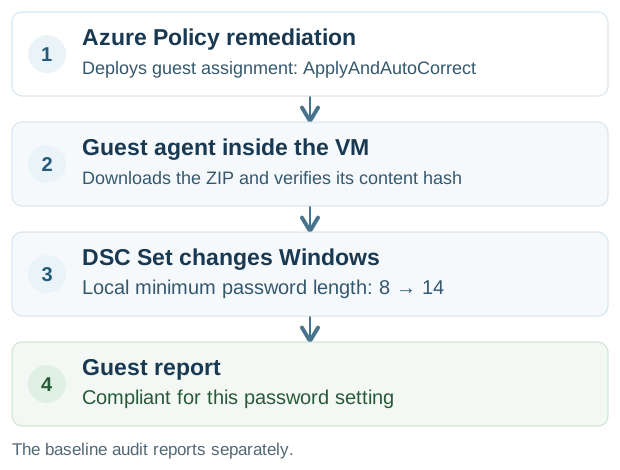
For the package and DSC basics, read DSC, simply.
Technical implementation with Azure Policy
1. Write and package the Windows setting
Use a PowerShell DSC resource with three operations:
| Operation | Minimum password length example |
|---|---|
| Get | Read the current Windows value with secedit. |
| Test | Return true when the value is at least 14. |
| Set | Use net accounts to set 14 only when the current value is lower. |
The custom WindowsPasswordPolicy resource leaves stronger existing values unchanged. Compile the DSC configuration into a MOF and build an AuditAndSet ZIP. The package contains that compiled configuration, resource modules and metadata. It is a specific package format, not an arbitrary zipped script. The Windows workflow uses PowerShell 7 with pinned GuestConfiguration 4.12.0 and PSDesiredStateConfiguration 2.0.7. Package authoring.
Before deployment, test the package on a disposable Windows machine:
Get-GuestConfigurationPackageComplianceStatus -Path ./WindowsPasswordMinimum_v1_0_0.zip
Start-GuestConfigurationPackageRemediation -Path ./WindowsPasswordMinimum_v1_0_0.zip
Get-GuestConfigurationPackageComplianceStatus -Path ./WindowsPasswordMinimum_v1_0_0.zip
The Windows package tests passed: 8 changed to 14, the string parameter "14" worked, and a value of 14 stayed unchanged when the required minimum was 12. The middle command changes that disposable runner; it does not test Azure Policy deployment. Package testing.
2. Deploy the package and policy through IaC
The implementation uses this folder:
platform/vm-guest-configuration/
  packages/WindowsPasswordMinimum/  # DSC configuration and resource
  parameters/windows-password.json # Required value and package version
  parameters/hosting.tfvars         # Package storage settings
  scripts/                         # Build, test, publish, generate policy
  main.tf                          # Azure package storage
The JSON setting is "minimumPasswordLength": 14. A Windows GitHub Actions workflow builds, tests and publishes the versioned ZIP. Terraform creates its storage. Definition and assignment JSON files stay in the existing platform/policy-management/ folders. Each assignment folder's _scope.json selects the scope.
Publish the tested ZIP at a versioned address, then generate a custom DeployIfNotExists definition with New-GuestConfigurationPolicy. Use ApplyAndAutoCorrect. The generated definition contains the package address, content hash and guest-assignment deployment. Deploy that JSON through the policy IaC pipeline. Policy generation.
This example uses a dedicated Blob container with anonymous blob reads for the generic package only. Anonymous listing and writes are disabled. Uploads require Microsoft Entra authentication; shared-key access is disabled. The ZIP contains no tenant details, credentials or secrets. The VM downloads it without a SAS token or storage role, and the policy pins its SHA-256 hash. A private repository's release download would not provide this anonymous access.
Keep these policy assignments separate:
| Assignment | Purpose |
|---|---|
| Windows baseline audit | Report the existing Windows baseline checks. |
| Guest Configuration prerequisites | Enable VM identity and install the extension. |
| Custom password configuration | Deliver the package that changes minimum password length. |
Deploy the custom definition at your organisation's root management group and initially assign it to a test subscription. IaC also creates the assignment's managed identity and grants Guest Configuration Resource Contributor at the target scope. The definition's roleDefinitionIds describe the permissions; writing those IDs does not grant the roles. Remediation permissions.
For the initial audit-then-remediate test, use this assignment-parameters fragment:
{
  "MinimumPasswordLength": { "value": "14" },
  "EnableAutoRemediation": { "value": "false" }
}
Both values are strings. EnableAutoRemediation: "false" controls the service's metadata-driven automatic application; it does not disable DeployIfNotExists. Creating or updating the VM resource in Azure can still deploy ApplyAndAutoCorrect. For this audit-first test, avoid VM resource updates until the explicit remediation task. Once deployed, the guest assignment's mode controls later drift correction. Generator parameters · Remediation behavior.
3. Remediate the existing VM
First confirm the existing Windows value and the custom Audit guest report. In this test, both showed 8 against a required 14, and the report was NonCompliant before remediation. The built-in baseline's password check also reported NonCompliant.
Create an Azure Policy remediation task for the custom password policy. This deploys the guest assignment as ApplyAndAutoCorrect. Here, $VM_ID is the target VM's Azure resource ID and $POLICY_ASSIGNMENT_ID is the custom Azure Policy assignment ID:
az policy remediation create \
  --resource "$VM_ID" \
  --name remediate-password \
  --policy-assignment "$POLICY_ASSIGNMENT_ID" \
  --resource-discovery-mode ExistingNonCompliant
ExistingNonCompliant uses the policy's recorded noncompliant state. Confirm that state before running it. Azure Policy remediation · Machine Configuration apply modes.
The agent inside Windows then checks the value, applies the correction and reports its result. Later changes below the required minimum are corrected by the agent's next evaluation; they do not need another Azure Policy remediation task.
4. Verify the setting, not just the deployment
The Azure Policy remediation completed with one successful deployment and no failures. The custom guest assignment changed from Audit to ApplyAndAutoCorrect.
| Evidence | Before remediation | After remediation |
|---|---|---|
| Custom guest report | Minimum length 8, required 14 — NonCompliant | Minimum length 14, required 14 — Compliant |
| Independent Windows read | 8 | 14 |
| Custom Azure Policy compliance | NonCompliant | Compliant |
| Built-in baseline: Minimum password length | NonCompliant | Compliant — value 14, required 14 |
The custom report and a read-only secedit export both confirmed 14. No command manually set 14 on the Azure VM; the package applied it after policy remediation. The next built-in baseline report also marked Minimum password length as Compliant.
Reporting intervals are package-specific. In this lab, the custom package used 15 minutes and the built-in baseline used 60 minutes. After recording the corrected value, we requested a fresh baseline audit with one agent-service restart on the isolated test VM. This was a lab verification step; the package had already corrected the setting.
A successful remediation deployment alone does not prove that Windows changed. Guest reports and Azure Policy compliance can arrive at different times. The full Windows baseline remained NonCompliant because other checks still failed. This remediation fixed the minimum-password-length check.
This resource refuses to run on domain controllers. Test it on standalone Windows machines first; domain policy can override local settings on domain-joined machines. Removing the Azure Policy assignment does not restore the old Windows value; use a separate rollback configuration if needed.
Where to look
Azure portal → Policy → Compliance → this policy → a machine. Open its Machine Configuration details to see individual failed checks.
The Machine Configuration extension checks inside the VM. Its prerequisites must be installed before the baseline can report correctly.
JSON and references
- Policy JSON · version 2.1.1 — checks the
AzureWindowsBaselinereport; it does not contain every Windows setting. - Full Windows settings reference
- How to view individual results