MCSB managed centrally, simply
One security baseline assignment across subscriptions: why it helps, how inheritance works, and where ASC Default overlaps.
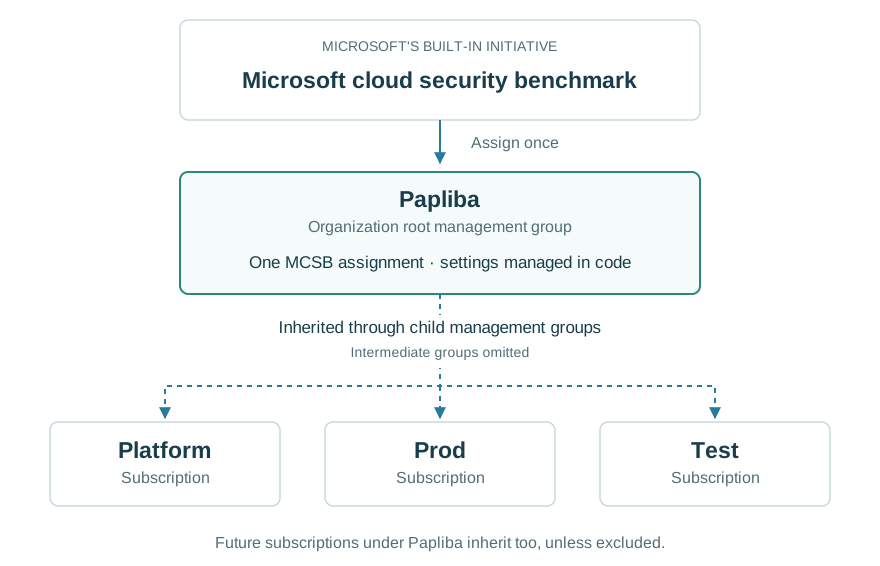
MCSB means Microsoft cloud security benchmark. In Azure Policy, its built-in initiative groups security checks. An assignment applies those checks to a scope.
Managing MCSB centrally means keeping one shared assignment at a management group. Its child subscriptions inherit it. Microsoft documents this approach for existing and future subscriptions. Microsoft: managing MCSB at scale.
Why use a management group?
Take Papliba, an organization root management group below Azure's tenant root. Platform, Prod and Test sit beneath it through child management groups.
An MCSB assignment at Papliba gives the platform team:
- One configuration: maintain supported effects and parameters once.
- Shared coverage: subscriptions placed below Papliba inherit the assignment.
- Controlled exceptions: exclude a scope or record an exemption when needed.
For example, change a supported check's parameter in the central assignment. That setting applies across its included scopes after policy evaluation. There is no need to edit that assignment separately in every subscription. Assignment scope.
What about ASC Default?
Defender for Cloud enables MCSB by default when an account is onboarded. In Azure Policy, you may already see a subscription assignment displayed as ASC Default, with resource name SecurityCenterBuiltIn. See ASC Default, simply.
Adding a management-group assignment does not replace that subscription assignment. Both can apply. Different parameters or effects can create conflicting expectations. Check the existing assignments before introducing another. Manage MCSB recommendations.
An exception is also specific to its assignment. Exempting Test from the central assignment does not exempt it from a separate subscription assignment. Policy exemptions.
What do we keep in code?
| Part | Who manages it? |
|---|---|
| Built-in MCSB initiative and its definitions | Microsoft. Reference the initiative rather than copying its checks. |
| Assignment scope, parameters and exclusions | The platform team, in reviewed configuration files. |
| Evaluation of resources | Azure Policy, using the applicable assignments. |
In a folder-based policy repository, the assignment could live at assignments/papliba/pa-mcsb.json. Terraform reads it and deploys the assignment. The Microsoft built-in initiative does not need a new custom definition in our repository. Policy assignment structure.
How would we introduce it?
- List existing MCSB assignments, their settings and their owners.
- Start with a limited test scope and review the proposed deployment.
- Use
DoNotEnforceto evaluate compliance without automatic enforcement from that assignment. - Compare the results, resolve overlap with existing assignments, then expand coverage.
DoNotEnforce still evaluates compliance. Disabled stops evaluation of that policy. Other assignments remain effective, and manual remediation is still possible. Enforcement mode.
When is it worth doing?
Use central management when you want a deliberate, shared security configuration across subscriptions. For a small setup using the default checks, keeping the Defender defaults and adding a few targeted policies may be simpler. Review existing Defender-managed assignments before changing their ownership or removing them.
A central assignment also does not mean every VM setting is automatically fixed. The selected policy effects and remediation setup determine what changes. Paid Defender plans have their own enablement steps. For Windows settings, see Azure Windows baseline, simply.