Windows password age through policy, simply
Follow the code from a Windows password setting to a package, Azure Policy and automatic correction.
Azure Policy deploys the configuration assignment. The agent inside Windows changes the setting. This example enforces a local maximum password age of 42 days or fewer, excluding unlimited expiration. It uses a small DSC resource and the existing Machine Configuration prerequisites.
42 days is the value chosen for this baseline exercise, not a universal password recommendation. Microsoft's current security guidance does not recommend routine password expiration as a substitute for modern protections. Choose your organisation's requirement deliberately. Maximum password age.
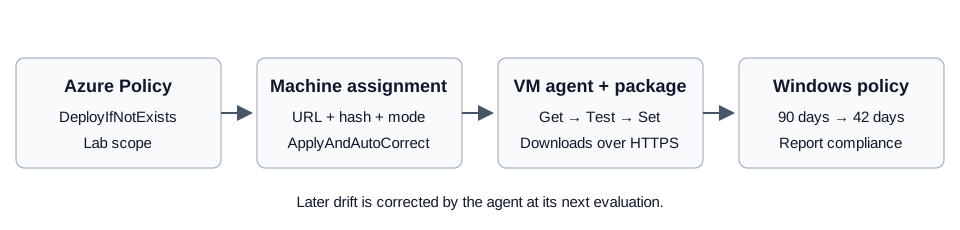
What changes inside Windows?
Open secpol.msc inside the VM, then Account Policies → Password Policy → Maximum password age.
| Current setting | Package behaviour |
|---|---|
| 90 days | Change to 42 days. |
| 42 days | Leave unchanged. |
| 30 days | Leave unchanged; it already meets this limit. |
| Unlimited | Change to 42 days. |
This changes the local rule. It does not generate, read or reset account passwords. Accounts marked Password never expires retain that exception. Microsoft Entra password rules are separate. Domain policy can override local settings; this resource rejects domain controllers.
Follow the files
The public example source lives in maximum-password-age.
| File | Purpose |
|---|---|
parameters.json |
Package name, version and desired age. |
Modules/WindowsMaximumPasswordAge/WindowsMaximumPasswordAge.psm1 |
Reads, checks and changes the Windows setting. |
Modules/WindowsMaximumPasswordAge/WindowsMaximumPasswordAge.psd1 |
Declares the module version and exported DSC resource. |
Configuration.ps1 |
Connects the desired age to the DSC resource. |
Build.ps1 |
Compiles the configuration and creates the ZIP and hash. |
Test.ps1 |
Tests the package on a disposable Windows runner. |
The policy definition and assignment stay in the existing policy-management folders. We reuse their Terraform loader instead of building a second deployment framework.
1. The parameter file holds the desired value
{
  "name": "WindowsMaximumPasswordAge",
  "version": "1.0.0",
  "maximumPasswordAge": 42
}
The build reads this file. When changing the packaged configuration, increase the version, rebuild and test it, then update the policy's package URL and hash. Editing a local JSON file alone does not change a running VM.
2. Get reads Windows; Test decides compliance; Set repairs it
DSC means Desired State Configuration. Its three methods have separate jobs:
- Get: return the actual value and a readable reason.
- Test: return true when the actual value meets the requirement.
- Set: change an out-of-policy value, then check it again.
The read function exports the local security policy using Windows' own secedit tool:
secedit /export /cfg $path /areas SECURITYPOLICY /quiet
It reads the MaximumPasswordAge line from that temporary file, then deletes the file. This avoids parsing translated console labels from net accounts. The full function checks command failures and rejects domain controllers.
The central compliance condition is:
$actual -gt 0 -and $actual -le $age
A positive value no greater than 42 passes. Unlimited expiration fails; the exported representation can be nonpositive. This is why checking only “less than or equal to 42” would be wrong.
The repair uses:
if ($this.Test()) { return }
net.exe accounts "/maxpwage:$age"
When $age is 42, Windows receives net accounts /maxpwage:42. A second check verifies that the command actually produced a compliant setting. The resource reports an error if it cannot read or set the policy; it does not turn an execution error into a successful result.
The Reasons property supplies the readable compliance message. MaximumPasswordAge is a string in the DSC schema because Machine Configuration passes policy parameters as strings; the resource validates and converts it before using it.
3. The configuration connects data to the resource
The configuration contains one resource:
Node localhost {
    WindowsMaximumPasswordAge MaximumAge {
        Name = 'LocalMachine'
        MaximumPasswordAge = $MaximumPasswordAge
    }
}
localhost means the machine running the package. MaximumAge identifies this resource instance. LocalMachine is the supported target, not a particular VM name.
The build compiles this into a MOF file. The package contains that compiled description and the PowerShell module. It contains no VM names, tenant identifiers or credentials. The build removes runner paths and author metadata from the generated configuration.
4. Build an apply-capable package
The important build command is:
New-GuestConfigurationPackage -Name $packageName -Version $settings.version `
    -Configuration $mofPath -Type AuditAndSet -Path $outputPath -Force
This is an explanatory excerpt; Build.ps1 provides the actual paths. AuditAndSet makes a package that can both evaluate and apply its setting. The assignment mode later decides whether to audit, apply once or keep correcting drift.
The build writes a versioned ZIP and a manifest with its SHA256 hash. The workflow uses pinned GuestConfiguration and PSDesiredStateConfiguration versions so the tools used are explicit. Package authoring.
5. Host the ZIP somewhere the VM can reach
This lab uses a public GitHub URL in the portfolio repository, pinned to the commit containing the tested ZIP. The enterprise infrastructure repository remains private. The content is generic configuration code. A commit-pinned URL plus the package hash identifies the exact bytes to download.
A storage account is not mandatory. Microsoft supports HTTPS package hosting, including GitHub. Public package hosting is unsuitable for confidential content, and this approach requires outbound access to GitHub. A VM without a public IP can still have outbound access. For an environment with no public egress, use reachable private hosting and the required DNS and authentication instead. Package hosting.
Can we use an existing storage account with public access disabled?
Yes, with private connectivity and authentication. An account with public access disabled and no private endpoint cannot supply the ZIP to this VM simply because the VM is in Azure.
For this alternative, manage the following in IaC:
- A Blob private endpoint connected to a network reachable from the VM.
- Private DNS so the normal storage hostname resolves to that endpoint's private IP from the VM.
- A user-assigned managed identity attached to the VM, granted Storage Blob Data Reader on the package container and referenced for package downloads.
- An upload runner with private connectivity and write permission to that container.
- The guest assignment's storage URL, hash and content identity.
The VM's system-assigned identity remains a prerequisite; the content-download identity has a separate purpose. Microsoft documents a user-assigned identity or SAS for protected package access. Authentication does not provide a network path. GitHub-hosted runners on the public internet do not automatically reach a private endpoint. Service endpoints are not required for this private-endpoint design. Secure package access.
This is an alternative hosting design. The implementation demonstrated here currently uses the public, generic package. It does not provision private storage connectivity.
6. DeployIfNotExists delivers the assignment
The custom Azure Policy definition contains:
- A condition selecting Windows Server 2022 and 2025 Azure VMs.
- DeployIfNotExists as its effect.
- The guest assignment's expected compliance and parameter hash.
- An ARM deployment with the package URL, SHA256 hash and ApplyAndAutoCorrect mode.
The assignment supplies the desired value as a policy parameter. The mapping to the DSC resource is:
[WindowsMaximumPasswordAge]MaximumAge;MaximumPasswordAge
Read it as resource type → resource instance → property. It must match the configuration and module exactly.
The assignment supplies these values:
"parameters": {
  "MaximumPasswordAge": { "value": "42" },
  "EnableAutoRemediation": { "value": "true" }
}
EnableAutoRemediation is a string parameter used by Machine Configuration metadata. It is separate from the policy's enforcementMode: "Default" and the guest assignment's assignmentType: "ApplyAndAutoCorrect". Together they request enabled deployment and ongoing correction. They do not change the built-in audit baseline into a repair package.
The complete policy definition and assignment example are available with the source. Replace the example management-group placeholder and choose your assignment scope before deployment. Its ARM deployment is the necessary payload for DeployIfNotExists; it is not another service or a script runner. The existing Terraform code reads the definition, assignment and IAM JSON files. No new Terraform module is needed.
The definition is reusable. Its first assignment is scoped to the lab resource group, so it does not change every Windows VM in the organisation. The policy assignment's managed identity receives the required Guest Configuration deployment role at that scope. The VM retains its own separate system-assigned identity.
DeployIfNotExists does not execute PowerShell directly. It creates the machine assignment. The installed agent downloads the ZIP and runs the DSC resource locally. How policy remediation works.
7. Verify Windows, not just the deployment
The Windows runner tests that 90 days is noncompliant, remediation sets 42, a shorter period remains unchanged, and unlimited expiration is corrected. It restores its original policy in finally.
For the Azure VM, verify the package download, assignment mode, compliance reason and Windows setting. Existing VMs can need an initial Azure Policy remediation task. After the apply assignment is delivered, ApplyAndAutoCorrect corrects later drift at the agent's next evaluation.
A successful ARM deployment alone proves neither that the ZIP downloaded nor that Windows changed. Check the guest report timestamp as well. The built-in Windows baseline is a separate report; fixing this setting does not make every baseline check compliant.
Verification status
Verified on 9 September 2026, using a Windows Server 2025 Azure VM:
| Check | Result |
|---|---|
| Disposable Windows package tests | Passed: 90 → 42, preserve 30, correct unlimited, restore runner. |
| Terraform deployment | Policy definition, lab assignment and deployment role created through IaC. |
| Test preparation inside the VM | Local maximum password age changed to 90. |
| Azure Policy remediation | One successful deployment, zero failures. |
| Guest assignment mode | ApplyAndAutoCorrect. |
| Guest report | Compliant: maximum password age 42, required at most 42. |
| Independent Windows read after remediation | secedit confirmed MaximumPasswordAge = 42. |
The guest report was evaluated at 07:16 UTC. The agent applied the correction; the test preparation command only set 90. This verifies the initial application. A separate later-drift test on the Azure VM has not been completed. The built-in Windows baseline remains a separate assessment.
Related reading
Machine Configuration, simply explains the portal views and identities. Azure Windows baseline, simply covers the earlier minimum-password-length example. DSC, simply explains the configuration model.